


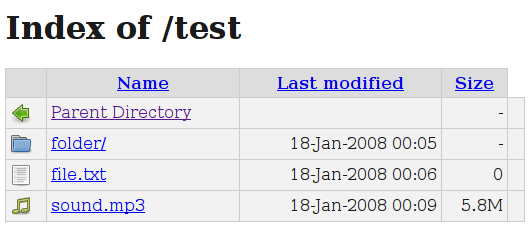
If you create a new directory on your website and "index.html" file is not present in that particular directory, anyone access that directory e.g. from web browser, he/she can get a directory listing of all the files in that directory. For example, if you create a folder called "upload", you can see everything in that directory simply by typing "http://www.example.com/upload/" in your browser and that too without password.
Apache comes with this feature enabled but it’s always a good idea to disabled it unless you really need it.
To disable or remove directory listing/browsing in Apache,
1. Open up terminal
2. Go to $Web_Server/conf directory
3. Open httpd.conf or apache2.conf using vi
# vi /etc/apache2/apache2.conf
4. To prevent directory listings, Search for Directory and change Options directive to ‘None’ or ‘-Indexes’ (without quotes)
Example:
<Directory /home/webuser/public_html>
Options -Indexes
</Directory>
Or
<Directory /home/webuser/public_html>
Options None
</Directory>
5. Restart Apache Service
# /etc/init.d/httpd restart
Or
# /etc/init.d/apache2 restart
Using .htaccess Files with Apache
Make sure .htaccess file support is enabled and you can place below line Options -Indexes in .htaccess file.
Append following apache directive:
Options -Indexes
After disabling directory listing if you try to access directories via web browser, you should get below page.


